# Overview
Webhooks are used to notify your server about events that happen with your Memento Yearbook account, such as yearbooks being submitted or cancelled. You can use these notifications to integrate Memento Yearbook with your own applications and in-house workflows.
You can begin using webhooks in just three steps:
- Add a webhook endpoint on your server, or use one of our examples
- Register the endpoint in your Webhook Dashboard (opens new window)
- Remember to update your code with the signing secret so you can verify webhook signatures
- Use the webhook testing tool (opens new window) to verify that your endpoint works - then go live
# Creating a webhook endpoint
The webhook endpoint is just code on your server, which could be written in Node.js, PHP, Ruby, Python or whatever language you chose.
In general, there are three requirements for this endpoint:
- It must be publicly accessible as a FQDN, e.g.
https://api.acmepublisher.com/mybWebhook - It must accept an HTTP
POSTrequest inJSONformat - It must return a
2xxstatus code quickly
If you already have a public API written in a framework such as Express, Laravel, Django or Rails, then most of the hard work is done. The webhook endpoint is simply another POST route handled by your API.
If you do not already have an API which you can use, the code samples offer a starting point to build from.
# Code examples
Example webhook endpoints for Node.js, PHP and Python are available in this Bitbucket Repo (opens new window).
# Quick start
The following guide will walk you through setting up a webhook endpoint on your local computer which responds to events sent from Memento Yearbook.
To test the integration, we'll be exposing the development server (temporarily) using ngrok (opens new window). For production use, you will want to host this endpoint on a real server, or integrate it with an existing API.
# Requirements
We'll be using the Node.js example in this guide. You will need the following installed:
- Node.js (opens new window)
- yarn (opens new window) (recommended) or npm (opens new window)
- ngrok (opens new window) - to expose your development server online for testing
# Running the example webhook client
- Clone our demo repo (opens new window)
- In a terminal, navigate to the
webhooks/nodefolder and runyarnto install dependencies - Run
node index.jsto launch the server- You should see a message:
Example webhook client listening at http://localhost:3001
- You should see a message:
# Exposing your local dev server
In order to test your integration, Memento Yearbook needs to send events to your development server. To do this, we'll use ngrok (opens new window), which provides a simple secure tunnel to your localhost server.
In a separate terminal, run ngrok http 3001
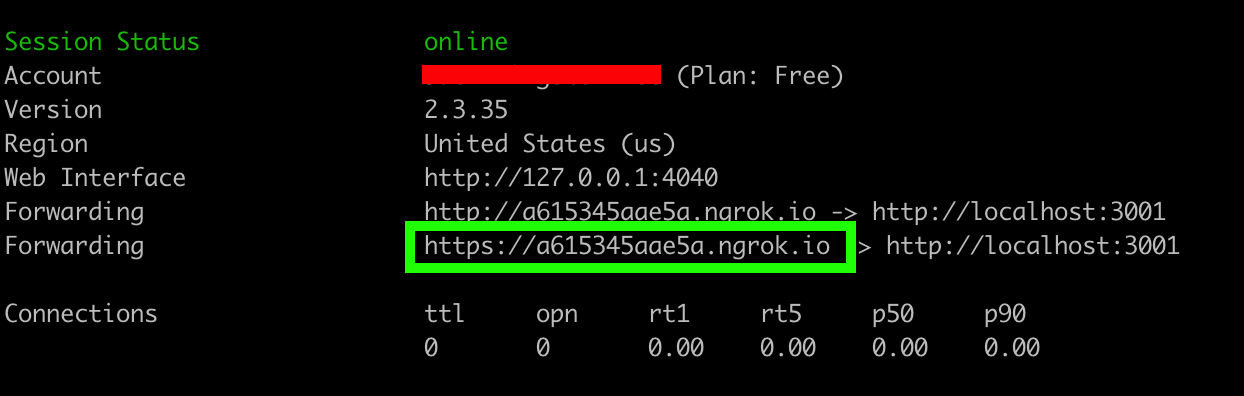
Copy the https url (highlighted in green above).
TIP
Ngrok is for assisting with local development only. For production use, this endpoint should be hosted on a real server over SSL.
# Configuring your endpoint
Open a web browser and visit the Webhook Dashboard (opens new window). Click Setup Webhook and enter the url you copied from the ngrok terminal with /webhook added to the end, e.g:
https://xxx.ngrok.io/webhook
TIP
The Node.js/Python examples listen for requests on /webhook (the PHP example does not listen on any specific route).
# Update your webhook signing secret
Memento yearbook signs webhook events it sends to your endpoint. This allows you to verify that the events were sent by MementoPix and not a third party.
Before you can verify signatures, you need to retrieve your endpoint's signing secret from your Webhook Dashboard (opens new window).
Take this value and update it in your webhook endpoint:
// update the signing secret with the value in your publisher dashboard
const secret = "whsec_Ge3tGXAEEeEGLDJqtMDGfmn9VoqJXtQz";
if (!isValidSignature(request, secret)) {
    console.log("invalid webhook signature. aborting");
    return response.status(422).json({ message: "bad signature" });
} else {
    console.log("webhook signature is valid");
}
Restart your webhook endpoint for the changes to take effect (ctrl+c && node index.js).
# Sending a test event
In the Webhook Dashboard (opens new window), click Send test webhook. Choose proof.submitted in the event dropdown and click Send test webhook
You should see a response with 200 - OK, which means the event was successfully sent to your webhook endpoint.
TIP
Test events have a boolean property of is_test_event set to true. Your webhook endpoint should check this property to make sure you don't perform unnecessary actions when receiving test events.
# Handling webhook events
In the examples provided, the webhook endpoint is deliberately barebones - it simply parses the request, determines the event type and does nothing.
For your own real-world use, you will want to modify the event handlers to trigger your own workflows (for example, downloading a PDF). For a full list of events, including when and what is sent, consult our Event List.
# Going live
Once you've modified your webhook endpoint to handle the events as necessary, move your code to run on a production server. Expose it as a FQDN over https (e.g. https://api.acmepublisher.com/mybWebhook) and update the url in the Webhook Dashboard (opens new window).
Send a test event to verify the integration works and then click Enable to start receiving real events from Memento Yearbook.
# Performing a live integration test
Once you've enabled your webhook endpoint and have it running on a production server, we recommend performing a simple "real-world" test to ensure the entire workflow runs smoothly.
To do this, we recommend using a Demo yearbook and submitting the book/cover for printing. Then - as a publisher - cancel these submissions using the Proofing Dashboard (opens new window).
If all goes well, you should see successful webhook requests made to your endpoint in your Webhook Dashboard (opens new window), as well as any custom workflows you have integrated being triggered.
# Error handling
# Logs
The Webhook Dashboard (opens new window) logs all successful/failed attempts to your webhook endpoint in the last 90 days.
# Retries
At some point you may encounter a request to your endpoint which fails. This can be for a number of reasons, including:
- your endpoint not returning a
2xxstatus code - your endpoint taking too long to respond
- your endpoint being unreachable
- your endpoint having a bad/expired SSL certificate
When a request fails, we will attempt to deliver it a maximum of 3 times. An exponential backoff strategy is used to account for intermittent failures.
If after 3 attempts the delivery still fails:
- we will notify you via email of the failure
- the failed request will appear in your Webhook Dashboard (opens new window)
# Retrying failed requests
If a request fails, you can inspect the request, response status code and response body to help determine the cause of failure. Once you are confident that the issue has been fixed, you can retry the request.
Note: There is no limit on how many times you can retry sending a failed webhook request.
# Best practices
# Respond quickly
Your endpoint should return a status code of 200 quickly. Long delays are considered a timeout - which triggers Memento Yearbook to retry the request.
# Perform asynchronous tasks outside of the webhook endpoint
Since the endpoint must return a 200 response quickly, you should perform all long running tasks - e.g. downloading a PDF - asynchronously outside of the webhook.
For production workflows, you could consider:
- a web queue worker architecture, since it allows these tasks to be run asynchronously and retried in the event of failure
- calling another API which handles any long running tasks associated with the webhook events
# Verifying webhook signatures
Memento Yearbook signs each webhook request so you know it originated from us and not a third party.
Whilst not required, we strongly recommend your endpoint verifies this signature.
Our Bitbucket Repo (opens new window) contains examples of how to verify the signature in Node.js, PHP and Python, which can easily be ported to other languages.
If porting, make sure to pass the raw request body when computing the signature - i.e. don't run it through a JSON decode or other conversion.
/**
 * Determines if the webhook signature of the request is valid.
 * This allows you to verify that the events were sent by Memento Yearbook
 * and not a third party.
 *
 * @param request
 * @param secret
 * @returns {boolean}
 */
function isValidSignature(request, secret) {
	const signature = request.header("Signature");
	const computedSignature = crypto
		.createHmac("sha256", secret)
		.update(request.body, "utf8")
		.digest("hex");
	console.log(`sig: ${signature} | computed: ${computedSignature}`)
	return signature === computedSignature;
}
# Use HTTPS
We strongly recommend you expose your webhook endpoint via an HTTPS URL. Memento Yearbook will validate that your certificate is valid before sending your webhook data.
# CSRF protection
If you’re using Rails, Django, Laravel or another web framework, your site might automatically check that every POST request contains a CSRF token. Cross-site request forgery (opens new window) is an important security feature but it can interfere with processing webhook requests sent from Memento Yearbook. If so, you may need to exempt the webhook endpoint from CSRF protection.
# Webhook Events
# Event List
The following events are sent by Memento Yearbook:
proof.submitted- This event is sent when a book or cover is ready to print.
- You can expect to receive one event for the
bookand one event for thecover, each containing their respective PDFs to download. - If the proof is cancelled, this event maybe sent again, i.e. when the school submits another proof.
- Use cases:
- Downloading the PDF of the proof from S3 to your own server.
- this link expires after 3 months, so download it to your own servers before then.
- Providing your own proofing workflow to your schools.
- Downloading the PDF of the proof from S3 to your own server.
proof.cancelled- This event is sent when a book or cover that was ready to print is cancelled by the publisher
- Use cases:
- Voiding the state of a proof which was previously submitted.
# Event Data
To understand the data that each event sends, we recommend using the Webhook Testing Utility (opens new window) and inspecting the request payload sent to your endpoint.
Most properties are self-explanatory, but with that being said, here's a breakdown of the ones you are most likely to use:
event: proof.submitted
{
  "data": {
    "book_due_date": "2021-06-04T21:24:59Z",
    "book_editor_in_chief_email": "johndoe@example.com",
    "book_form_factor": {
      "maxDefaultPages": 100,
      "minDefaultPages": 20,
      "name": "8.5 x 11 Softcover",
      "outputSettings": {
        "dpi": 300,
        "dpiError": 100,
        "dpiWarning": 150,
        "outputType": "pdf",
        "pdfOutput": "oneFileForBookAndCover",
        "splitCover": "none"
      },
      "pageStarting": "right",
      "pageTypes": {
        "cover": {
          "bleed": {
            "bottom": 0.15,
            "left": 0.15,
            "right": 0.15,
            "top": 0.15
          },
          "cover": {
            "backFlap": 0,
            "frontFlap": 0,
            "orientation": "vertical",
            "spine": 0.75
          },
          "margins": {
            "bottom": 0.5,
            "left": 0.5,
            "right": 0.5,
            "top": 0.5
          },
          "pageHeight": 12.7,
          "pageType": "cover",
          "pageWidth": 19.9,
          "safeZone": {
            "bottom": 0.25,
            "left": 0.25,
            "right": 0.25,
            "top": 0.25
          },
          "unit": "inch"
        },
        "single": {
          "bleed": {
            "bottom": 0.15,
            "left": 0.15,
            "right": 0.15,
            "top": 0.15
          },
          "margins": {
            "bottom": 0.5,
            "left": 0.5,
            "right": 0.5,
            "top": 0.5
          },
          "pageHeight": 11,
          "pageType": "single",
          "pageWidth": 8.5,
          "safeZone": {
            "bottom": 0.25,
            "left": 0.25,
            "right": 0.25,
            "top": 0.25
          },
          "unit": "inch"
        }
      },
      "sku": "BOOK_YB_001",
      "totalPagesMultipleOf": 0,
      "type": "book",
      "version": 1
    },
    "book_id": "012343fc-96e6-11ea-918e-fa163ec9614d",
    "book_name": "Test Yearbook",
    "book_type_id": "c2728ec2-056f-11ea-8fb8-e6f5e375ad71",
    "book_type_name": "8.5 x 11 Softcover",
    "cover_due_date": "2021-06-04T21:24:59Z",
    "created_at": "2020-12-03T21:24:59Z",
    "created_by_display_name": "Test editor-in-chief",
    "created_by_user_id": 1,
    "final_pdf_url": "https://s3.us-east-1.amazonaws.com/us.s3.bm.mementoyearbook/book.zip",
    "final_pdf_url_expires_at": "2021-03-04T21:24:59Z",
    "final_flattened_pdf_url": "https://s3.us-east-1.amazonaws.com/us.s3.bm.mementoyearbook/flattened_book.zip",
    "final_flattened_pdf_url_expires_at": "2021-02-15T02:01:52Z",
    "proof_cancelled_at": null,
    "proof_cancelled_comment": null,
    "proof_id": "586c4bb4-96e5-11ea-a0cc-fa163ec9614d",
    "publisher_approved_at": "2020-12-03T21:24:59Z",
    "school_id": 1,
    "school_name": "Test School",
    "status": "APPROVED",
    "type": "book",
    "version": 1,
    "watermarked_pdf_url": "https://s3.us-east-1.amazonaws.com/us.s3.bm.mementoyearbook/book_wm.pdf"
  },
  "is_test_event": true,
  "request_id": "2a09cfbc-3677-11eb-8520-080027df145c",
  "type": "proof.submitted"
}
event: proof.cancelled
{
  "data": {
    "book_due_date": "2021-06-04T21:27:44Z",
    "book_editor_in_chief_email": "johndoe@example.com",
    "book_form_factor": {
      "maxDefaultPages": 100,
      "minDefaultPages": 20,
      "name": "8.5 x 11 Softcover",
      "outputSettings": {
        "dpi": 300,
        "dpiError": 100,
        "dpiWarning": 150,
        "outputType": "pdf",
        "pdfOutput": "oneFileForBookAndCover",
        "splitCover": "none"
      },
      "pageStarting": "right",
      "pageTypes": {
        "cover": {
          "bleed": {
            "bottom": 0.15,
            "left": 0.15,
            "right": 0.15,
            "top": 0.15
          },
          "cover": {
            "backFlap": 0,
            "frontFlap": 0,
            "orientation": "vertical",
            "spine": 0.75
          },
          "margins": {
            "bottom": 0.5,
            "left": 0.5,
            "right": 0.5,
            "top": 0.5
          },
          "pageHeight": 12.7,
          "pageType": "cover",
          "pageWidth": 19.9,
          "safeZone": {
            "bottom": 0.25,
            "left": 0.25,
            "right": 0.25,
            "top": 0.25
          },
          "unit": "inch"
        },
        "single": {
          "bleed": {
            "bottom": 0.15,
            "left": 0.15,
            "right": 0.15,
            "top": 0.15
          },
          "margins": {
            "bottom": 0.5,
            "left": 0.5,
            "right": 0.5,
            "top": 0.5
          },
          "pageHeight": 11,
          "pageType": "single",
          "pageWidth": 8.5,
          "safeZone": {
            "bottom": 0.25,
            "left": 0.25,
            "right": 0.25,
            "top": 0.25
          },
          "unit": "inch"
        }
      },
      "sku": "BOOK_YB_001",
      "totalPagesMultipleOf": 0,
      "type": "book",
      "version": 1
    },
    "book_id": "012343fc-96e6-11ea-918e-fa163ec9614d",
    "book_name": "Test Yearbook",
    "book_type_id": "c2728ec2-056f-11ea-8fb8-e6f5e375ad71",
    "book_type_name": "8.5 x 11 Softcover",
    "cover_due_date": "2021-06-04T21:27:44Z",
    "created_at": "2020-12-03T21:27:44Z",
    "created_by_display_name": "Test editor-in-chief",
    "created_by_user_id": 1,
    "final_pdf_url": "https://s3.us-east-1.amazonaws.com/us.s3.bm.mementoyearbook/book.zip",
    "final_pdf_url_expires_at": "2021-03-04T21:27:44Z",
    "final_flattened_pdf_url": "https://s3.us-east-1.amazonaws.com/us.s3.bm.mementoyearbook/flattened_book.zip",
    "final_flattened_pdf_url_expires_at": "2021-02-15T02:01:52Z",
    "proof_cancelled_at": "2020-12-04T21:27:44Z",
    "proof_cancelled_by_user_id": 1,
    "proof_cancelled_comment": "This comment includes the reason why the publisher cancelled this proof",
    "proof_id": "586c4bb4-96e5-11ea-a0cc-fa163ec9614d",
    "publisher_approved_at": "2020-12-03T21:27:44Z",
    "school_id": 1,
    "school_name": "Test School",
    "status": "REJECTED",
    "type": "book",
    "version": 1,
    "watermarked_pdf_url": "https://s3.us-east-1.amazonaws.com/us.s3.bm.mementoyearbook/book_wm.pdf"
  },
  "is_test_event": true,
  "request_id": "8c52d18c-3677-11eb-b5b8-080027df145c",
  "type": "proof.cancelled"
}
book_id- the unique ID for this yearbookbook_type_id- the unique ID for the book type associated with this yearbookbook_type_name- the name of the book typebook_form_factor.sku- the SKU associated with this bookfinal_pdf_url- the.zipfile for the book/coverfinal_pdf_url_expires_at- ISO 8601 date for when the.zipexpires at. This is 3 months after submission.proof_id- the unique ID for the proofrequest_id- a unique ID for this request. Immutable - persists if the request fails and is retriedstatus- the status of the proof (APPROVED|REJECTED)school_id- the school ID associated with this yearbooktype- the proofing type (book|cover)version- the number of times the book/cover has been submitted